Useful accessibility features for neurodivergent Apple users
Background sounds
Natural sounds like rain or a stream of water can help you focus if you’re in a noisy environment. Different “colors” of noise have also been shown to improve focus. If you’re using a Macbook, you can enable both natural sounds and different types of noise, without having to resort to YouTube.
To enable background sounds in macOS Sonoma:
- In System Settings, search for “Background sounds”.
- Enable Background sounds.
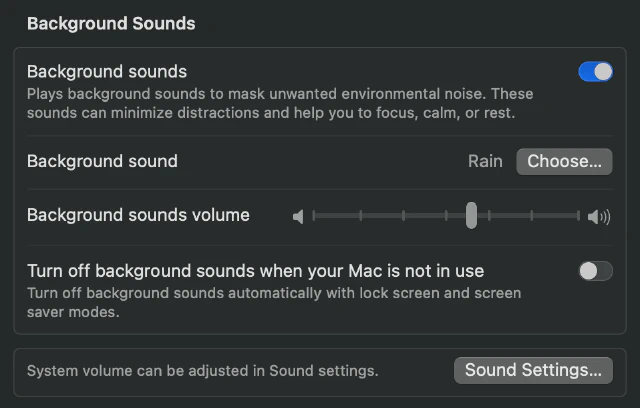
At the time of writing, you can choose between the following background sounds:
- Noise: Balanced Noise, Bright Noise, Dark Noise
- Natural sounds: Ocean, Rain, Stream
Note
Background sounds will stop after a little while after you enable them, which I’ve found somewhat annoying. Though you could also use it as a reminder to take a break and stretch.
Time announcements
macOS and the Apple Watch can notify you as time passes. If you have a tendency to hyperfocus, this can help you stay present and avoid having time running away from you.
Announce time in macOS Sonoma
- In System Settings, search for “Announce the time”.
- At the bottom, enable Announce the time.
You can change the Interval to announce the time hourly or every 30 or 15 minutes.
Enable chimes on Apple Watch
Apple Watch refers to the time announcements as chimes.
- Under Settings → Accessibility, select Chimes.
- Enable Chimes.
- Select Schedule to announce the time hourly or every 30 or 15 minutes.