Plugin development for Obsidian
Obsidian is a note-taking application that lets you create connections between your notes. Obsidian also lets users build their own themes and plugins to extend the application with custom functionality.
In 2022, I had already been an avid user of Obsidian and decided to develop my own plugins for the app. This page lists my journey and accomplishments while developing plugins for Obsidian.
Building my first plugins
My first plugin for Obsidian was to integrate Vale to check my notes for issues.
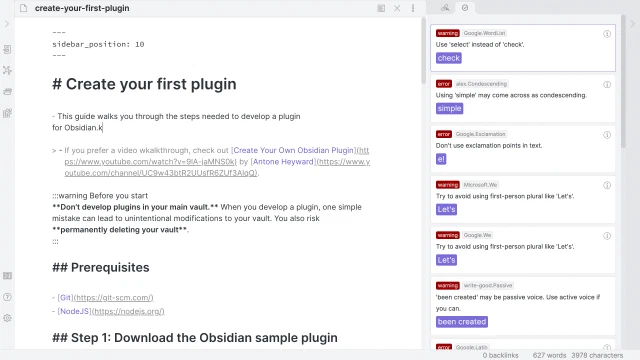
You can also see the Vale plugin in action during my interview with @ChrisChinchillaWatch on Creating a plugin for Obsidian.
I also published Pipe tricks for Obsidian, a plugin that let you use Wikipedia-style pipe tricks in Obsidian.
Plugin developer docs
Both the Vale and pipe tricks plugin were written prior to Obsidian 1.0. At the time, the only way to learn how to develop plugins for Obsidian was to join the developer community on Obsidian’s Discord server.
After building two plugins, I decided I would document my learnings. I created and published obsidian-plugin-docs, a Docusaurus site with tutorials and guides on plugin development.
I continued to improve the plugin docs and was later asked by the Obsidian team whether I was interested in making it the official docs.
Live stream for Obsidian October
As part of Obsidian annual month-long hackathon Obsidian October, I hosted a live stream once a week where I covered plugin development.
In the spirit of Halloween, I built a spooky plugin that I continued adding features to over the course of the hackathon.
- Let’s Build a Plugin For Obsidian October
- Accept user input using commands and ribbon actions
- Setting up plugin settings
- Display data in views and status bar
- Working with files and folders in your plugin
Each week I also interviewed a prominent plugin developer from the community:
- The past and potential of Dataview with Michael Brener
- Templater 101 with Sam Morrison
- Creating a theme for Obsidian 1.0 with Stephan Ango
- Easy and fast UI development with Svelte, with Maxime Cannoodt
Obsidian Projects
In 2022, I announced Obsidian Projects, an Obsidian plugin I had been working on for some time. Projects introduces project management to Obsidian by letting you view your notes in different ways—for example using a table, calendar, or a board view.
At the time of writing, the plugin has more than 390,000 downloads, and has been featured by a number of well-known personalities in the Obsidian community.
- Notion-like content calendar in Obsidian by @nicolevdh
- How To Use Obsidian: Project Management by +1creator
- You all NEED these Obsidian community plugins by @christianlempa
@nicolevdh later interviewed me about my motivation behind the plugin.
For more articles and videos by community, see Obsidian Projects on GitHub.